Secondary / Auxiliary Storage Devices


Secondary / Auxiliary Storage Devices
0
Categories : Basics of Computer , General

The auxiliary storage memory is also known as the secondary or external memory. This memory stores a large amount of data including system program, compiler, translator, assembler and other utilities programs. However, the secondary memory is regarded as non-volatile memory which  retains its data even when the computer is turned off. Therefore, it is also called permanent memory. 

There are a number of secondary storage devices such as Hard Disk, CD-ROM, Magnetic tape, Magnetic drum and flash memories (USB).  


Hard Disk


A Hard Disk Drive (HDD) or simply hard drive is counted in non-volatile memory storage which stores data on magnetized surface layers. A hard disk is often called a fixed disk because once it is installed, it will not have to be removed from the computer. A hard disk has a large capacity for storing data, normally measured in Gigabytes. The hard disk is a stack of a few thin metal plates, usually coated on both sides with a magnetized material. Data is stored as magnetic spots on tracks that form concentric circles on the surface of disks. In a hard disk unit, several disks are mounted as a pack on a vertical central shaft. The disks are slightly separated from one another to provide space for the movement of Read/Write head assemblies between them. The shaft revolves spinning the disks at a very high speed and then data is accessed.

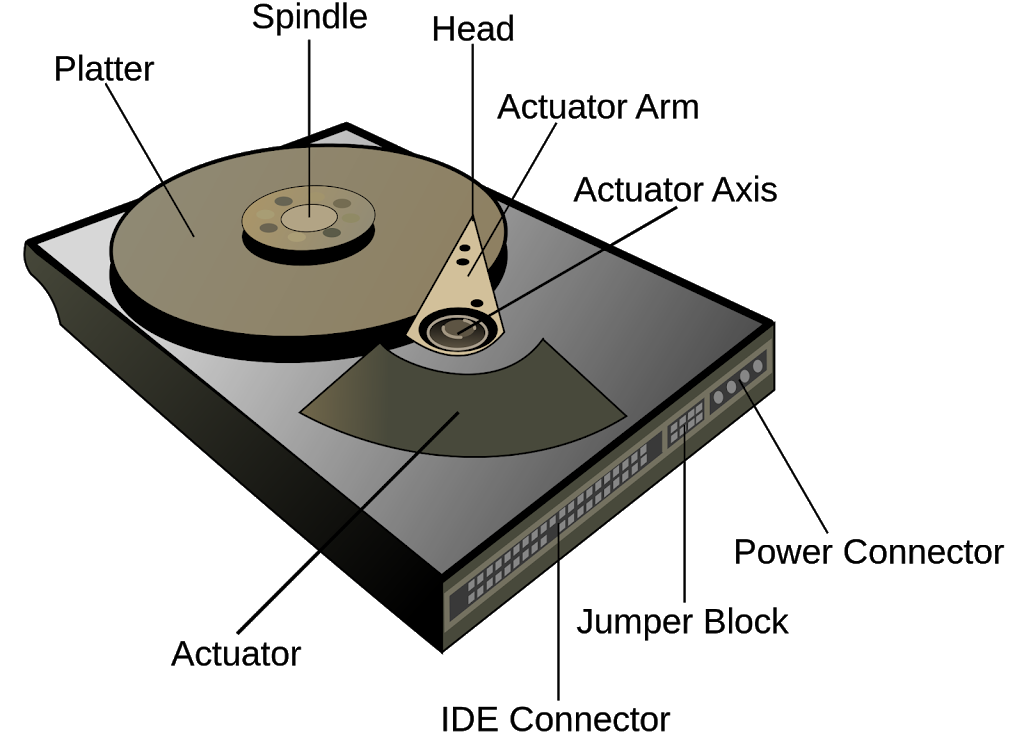
core components of the HDD work in concert to manage this data retrieval and storage:

  • Platter: The circular, magnetic disk where data is actually stored.

  • Spindle: The central shaft that rotates the platters at high speeds, allowing the heads to access different sections of the disks.

  • Head: A sensitive component located at the end of the actuator arm that reads from and writes data to the magnetic surfaces of the platters.

  • Actuator Arm: A mechanical arm that moves the head across the surface of the platter to position it over the specific data track required.

  • Actuator Axis: The pivot point around which the actuator arm rotates.

  • Actuator: The motor mechanism that drives the movement of the actuator arm to ensure precise positioning of the head.

  • IDE Connector: The interface port used to connect the hard drive to the motherboard for data transfer.

  • Jumper Block: A small set of pins used to configure drive settings, such as designating the drive as a master or slave device in older configurations.

  • Power Connector: The port that supplies the necessary electrical power from the computer’s power supply unit to the drive.

This article has been taken from the book “Basics of Computer, Third Edition” by Muhammad Umar. Want to read about the remaining secondary storage device. Get a copy here and enhance your understand and knowledge. It is a perfect book for both beginner and professionals.

Related Posts

Learn more General Concepts

Like, Share, and Follow Us!

Leave a Reply

Your email address will not be published. Required fields are marked *


Copyright © 2026 Basics of Computer